 Dispatch
 by OneLifeStack
A local-first API client.
Build, send, test and document APIs. No account, no cloud, no telemetry. Your collections stay on your device.
Version 0.4.2. Desktop for Windows, macOS and Linux, the same app in your browser, and a command-line runner for CI. Free.

- No account
- No cloud
- No telemetry
- Collections as files for git
- CLI for CI
What it does
Everything you need to work with an API.
One app for sending requests, checking responses, running them in bulk and documenting the result.
Requests
HTTP with params, path variables, headers and bodies: JSON, text, XML, HTML, urlencoded, multipart with files, binary and GraphQL. Also WebSocket, MQTT over WebSocket, server-sent events, Socket.IO and, on desktop, gRPC with server reflection or a .proto file. Several requests open in tabs.
GraphQL
Fetch the schema by introspection, get completions and checks as you type, and browse the schema with starter operations.
Auth
Basic, bearer, API key, Digest, OAuth 2.0 (client credentials, password, authorization code with PKCE, refresh), JWT and AWS Signature v4. Folders and collections can set auth for everything inside.
Variables and secrets
Globals, collection, environment, data-file and script scopes, plus 70 {{$random...}} fake-data generators. Secret values are hidden, left out of exports, and encrypted on this device.
Scripts and tests
Pre-request and post-response JavaScript with a pm API (variables, request edits, pm.test, pm.expect, pm.sendRequest). Scripts run in a sandbox with no network or storage access of their own. Common libraries can be loaded with require.
Browser logins
On desktop, a Browser login request drives your installed Chrome or Edge through a login page: open, type, click, wait. It keeps the cookies (HttpOnly too) or the token from local storage as secret variables, so the requests after it are signed in. It also runs in the runner, schedules and the CLI.
Flows
Wire saved requests together on a canvas with If, Script, Set variable, For each, Delay and End blocks. Requests branch on ok or failed, and each block shows its status live while the flow runs. Run flows in the app or with dispatch-run flow.
MCP
Test MCP servers: connect over HTTP or, on desktop, start a local server command, then list and call tools, read resources and get prompts. dispatch-run mcp works the other way round and lets an AI assistant list, send and run your saved requests, limited to the methods you allow.
Runner and data-driven runs
Run a collection, a folder or a suite, with iterations, delays, CSV or JSON data files and stop-on-failure. Export JSON or JUnit reports.
Load testing
Up to 200 virtual users with ramp-up, duration or loops, think time and pass/fail thresholds (p95, error rate, throughput). Latency and throughput charts, and a CSV of every sample.
Schedules
On desktop, run a collection every few minutes and get a notification when it fails. Results are kept.
Mocks and docs
Generated Markdown documentation per collection. A mock server that serves your saved examples, on desktop or with the CLI.
Collections as files
On desktop, save a collection as a folder of YAML files written as you work, so it can live in git. The CLI runs those folders.
Import and export
Import Postman collections and environments, Insomnia exports, Bruno folders, OpenAPI 3 and Swagger 2 (JSON or YAML), HAR files and curl commands. Export a Dispatch backup, one collection, or a Postman collection.
Code in 12 languages
Copy any request as curl, JavaScript fetch, Node axios, Python requests, Go, Java, C#, PHP, Ruby, Rust, HTTPie or PowerShell.
The CLI
dispatch-run runs collections, folders, suites and flows with environments and data files, runs load tests with pass/fail thresholds, serves mocks, and serves a collection to AI assistants over MCP. Built for CI.
Workspaces and tidy-ups
Group collections and environments into workspaces. Duplicate an environment. Parameterize turns hard-coded hosts, tokens and IDs in a request into variables, and is offered right after you paste a curl command. A variable can hold named alternatives, such as the load balancer or one instance, and the runner can run once per alternative to compare them.
Everyday comforts
A code editor with syntax colours and {{variable}} completion, undo for every delete, daily local backups with restore, drag and drop in the sidebar, search across bodies and headers (Ctrl+K), and response history with side-by-side compare.
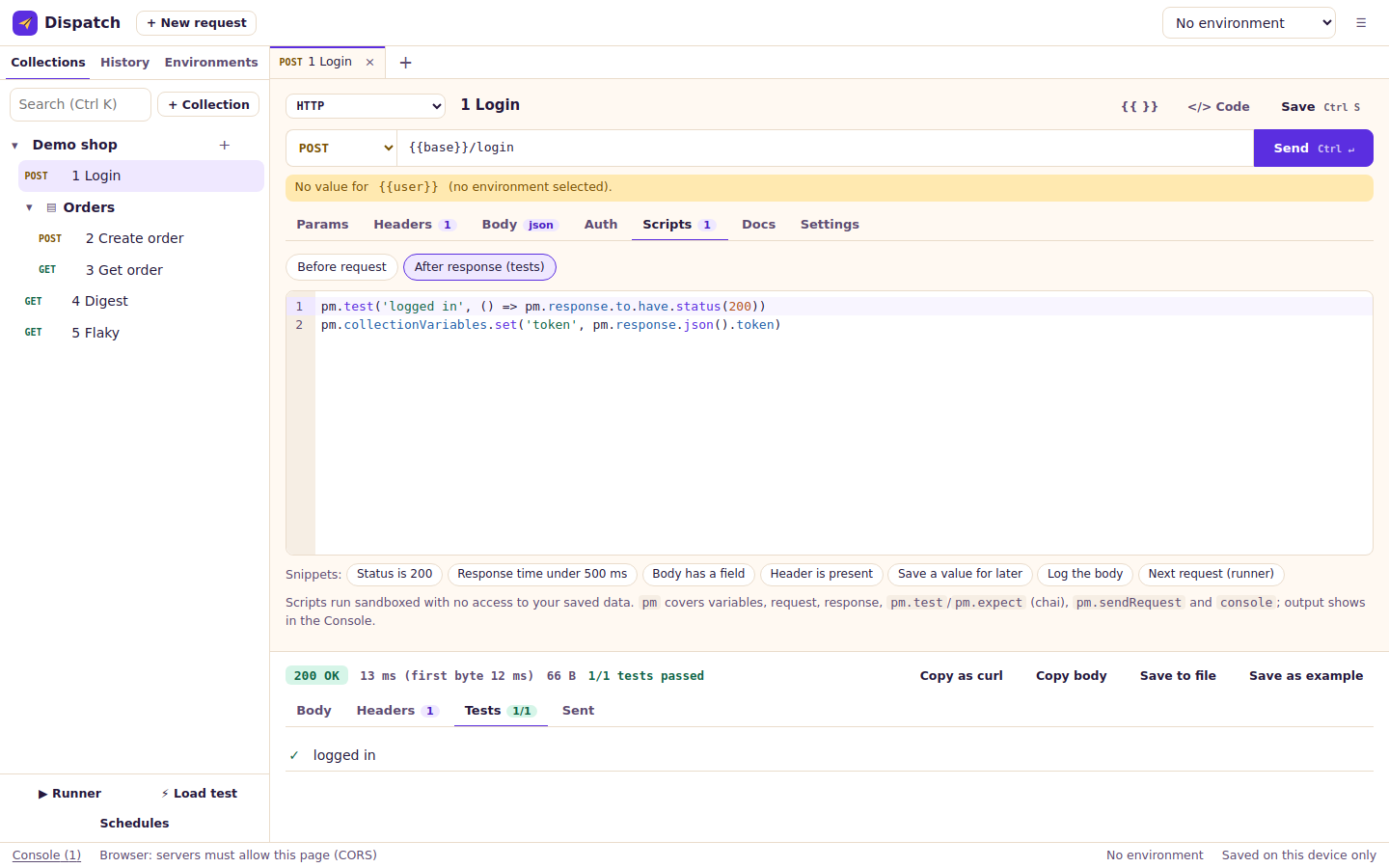
Scripts and tests
Check every response.
Write a few lines of JavaScript after a request to test the status, the body or the timing, and to save a value like a token for the next request. Each test shows as passed or failed under the response.
Scripts run in a sandbox, apart from the app and your saved data.
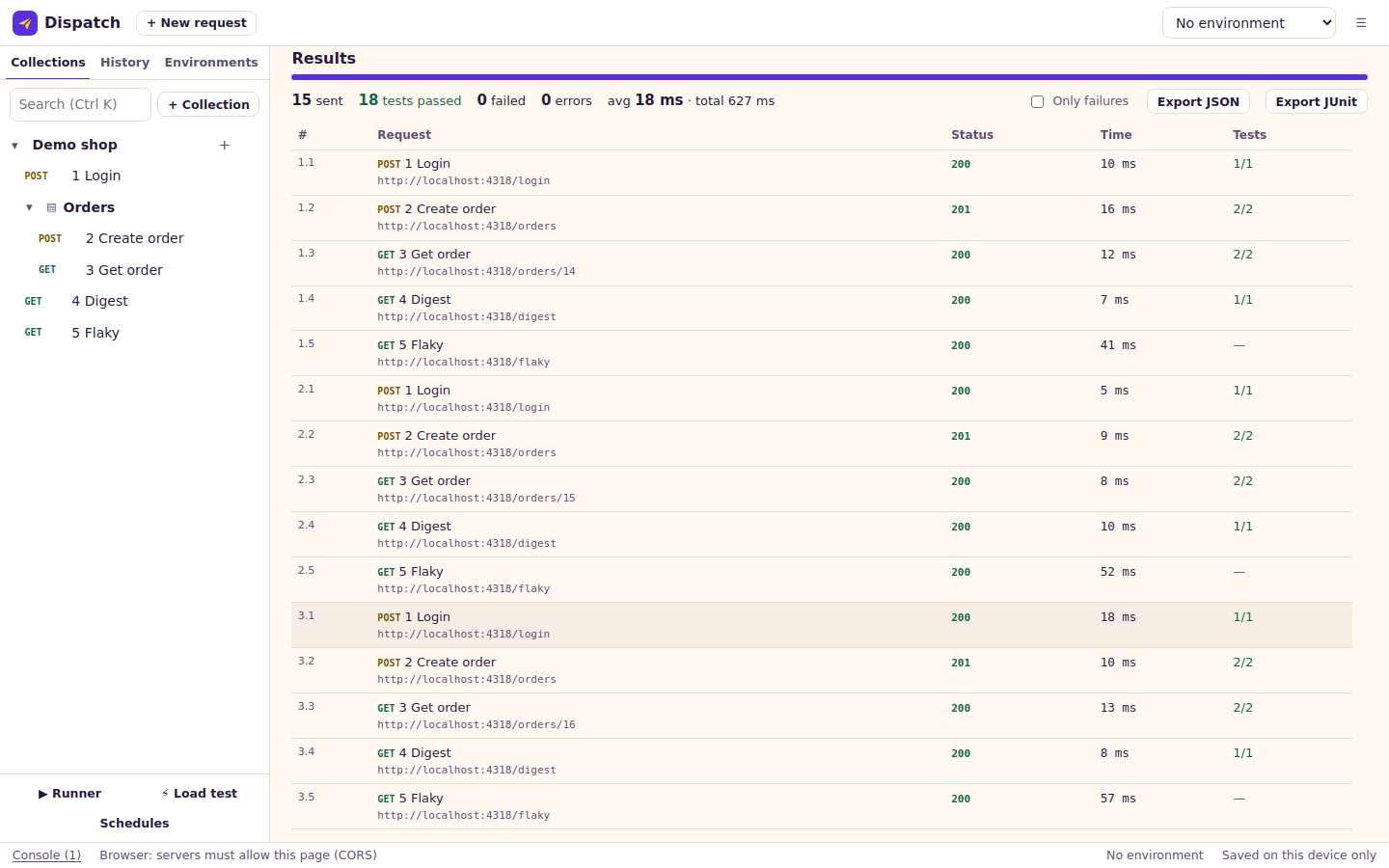
Runner
Run it again for every row.
Run a whole collection, a folder or several collections as a suite. Give it a CSV or JSON file and it runs once per row, with the columns as variables. Export the results as JSON or JUnit.
The same run works from the command line, so CI can do it too.
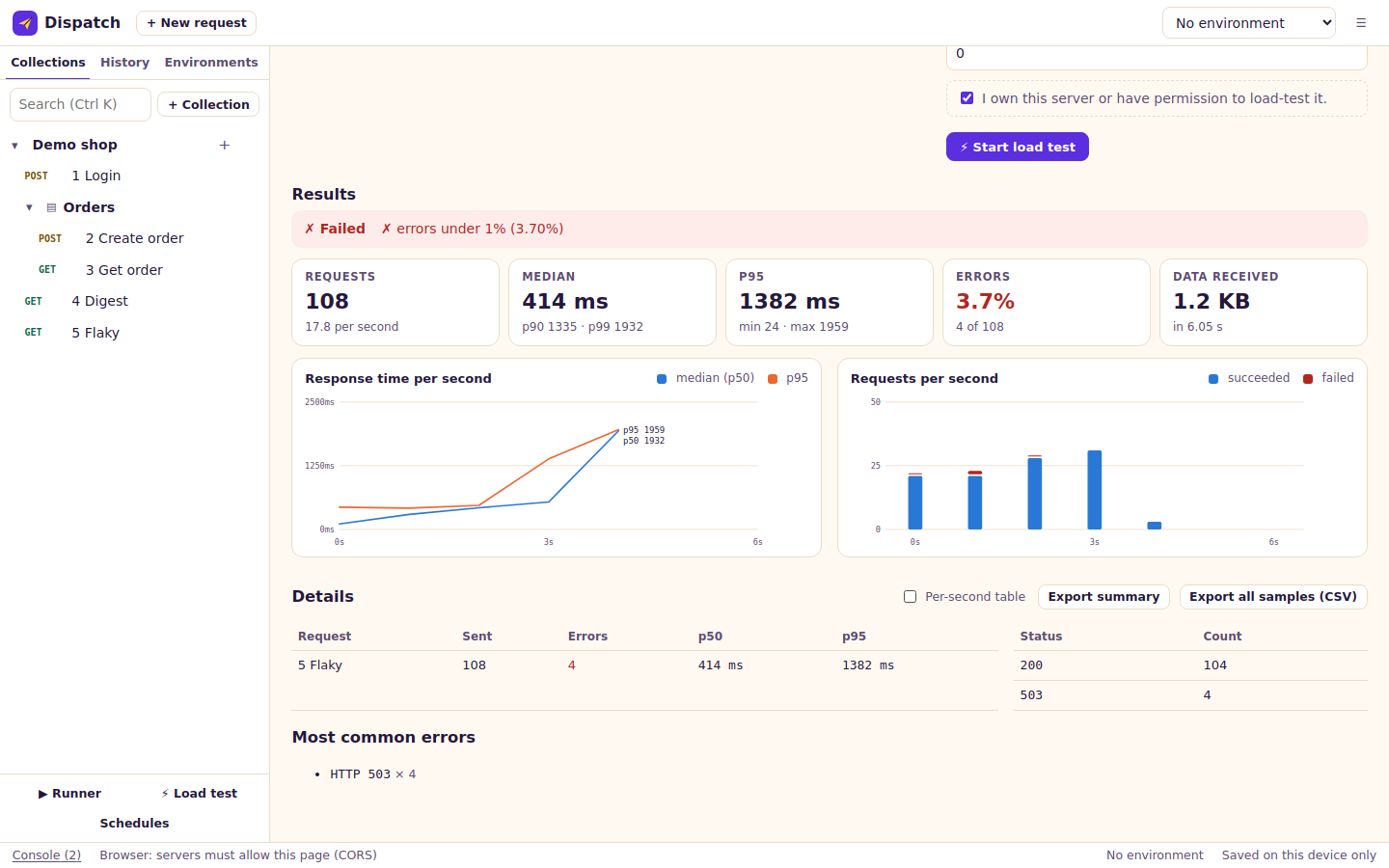
Load testing
See how it holds up.
Send the same request, or a whole flow, from up to 200 virtual users. Set pass and fail thresholds for p95 latency, error rate and throughput, and watch the charts.
Load test only servers you own or have permission to test. Dispatch asks you to confirm that before it starts.
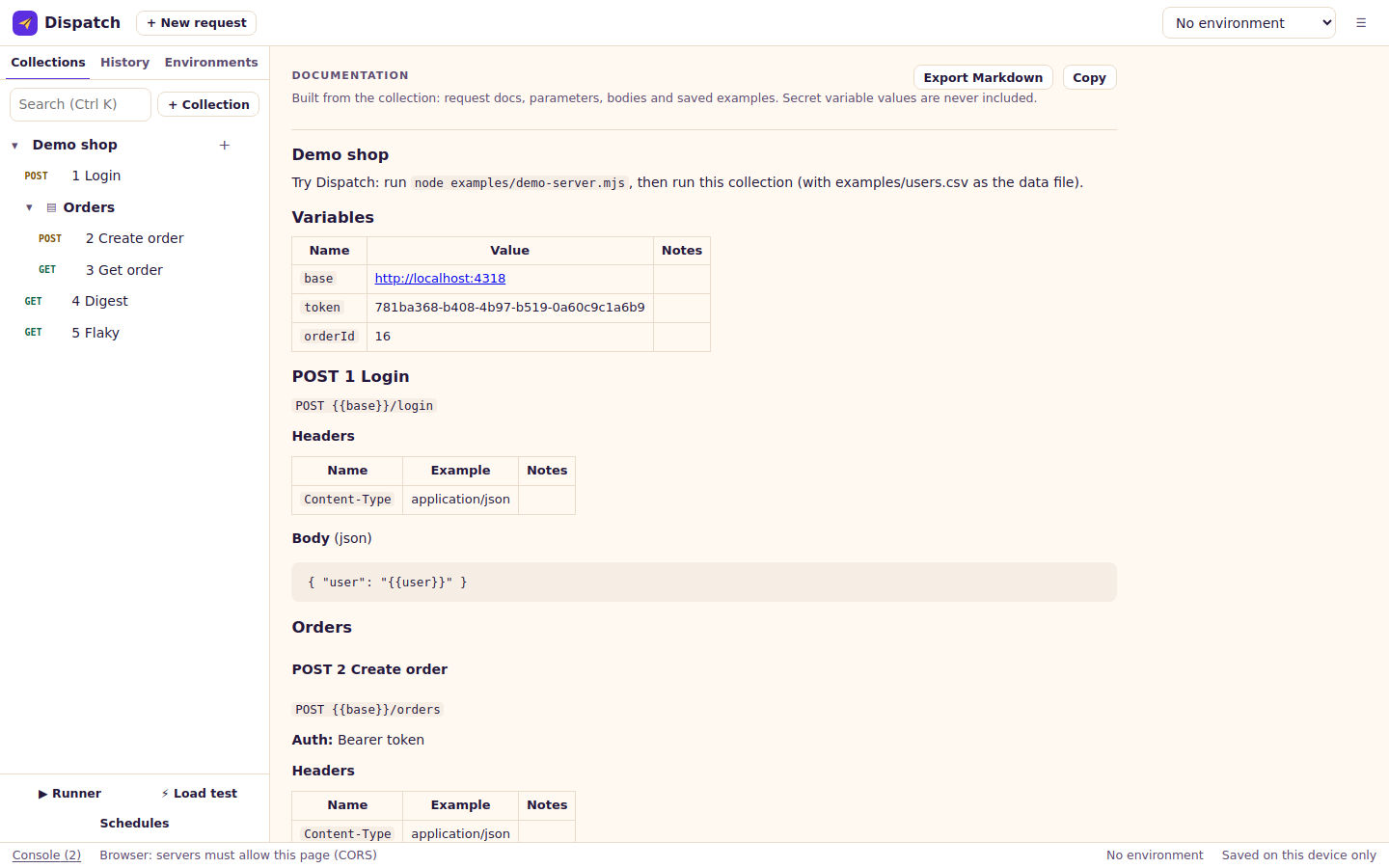
Docs and mocks
Documentation comes with the collection.
Dispatch writes Markdown documentation from your requests, parameters, bodies and saved examples, and leaves secret values out. Save a response as an example and a mock server can serve it back.
Bring what you have
Import, export, keep in git.
Dispatch reads the formats your collections are probably in, and writes its own as plain files.
- Postman collections and environments
- Insomnia
- Bruno folders
- OpenAPI 3 and Swagger 2
- HAR
- curl
- Postman export
- YAML folders for git
Import any of them from the menu, or paste a curl command into the URL bar. Names of other tools appear here only to describe file formats.
Desktop or web
Same app, two ways to send.
The desktop app sends requests from Rust, so it can reach any server. The web app uses the browser’s fetch, so the browser’s rules apply.
| Desktop | Web | |
|---|---|---|
| Requests are sent from | The Rust side of the app | Your browser, with fetch |
| Servers you can reach | Any server | Servers that allow it through CORS |
| Response headers shown | All of them | Only the ones the server exposes through CORS |
| Self-signed certificates | Allowed, if you turn it on | Up to the browser |
| Cookies | Cookie jar with a manager | The browser's own rules |
| Client certificates, extra CAs, proxy | Yes | No |
| gRPC | Yes | No |
| Browser logins | Yes, with your installed Chrome or Edge | No |
| MCP servers | Over HTTP, or a local command | Over HTTP, if the server allows CORS |
| Mock server | Yes | No (use the CLI) |
| Collections as files, schedules | Yes | No |
| Load tests | No browser limits | About six connections per server, and CORS applies |
| Everything else | Same | Same: tabs, scripts, runner, docs, imports, code generation |
Privacy
Your APIs are your business.
Dispatch has no servers of its own to send your data to. The privacy policy has the details in plain words.
Kept on your device
- Collections, requests, environments, history and settings
- Secret values, encrypted with a key that stays on the device
- Daily local backups
- Everything the app saves, in local storage or in the folder you pick
Never happens
- No account or sign-in
- No analytics, telemetry or crash reports
- No update checks or other calls home
- No fonts, scripts or images from other sites
- No server that receives your collections
Coming next
Planned, not shipped.
These are ideas we intend to build. They are not in the current release, and there is no date.
Sign-in for MCP servers Planned
Connect to MCP servers that need you to sign in with OAuth, with the token kept as a secret.
Signed installers Planned
Code-signed installers for Windows and macOS, so they open without a warning.
FAQ
Good questions.
Is Dispatch free?
Yes. There are no accounts, ads or paid tiers.
Where is my data stored?
On your device. The desktop app and the web app both keep collections, environments and history in local storage (IndexedDB). With collections as files on desktop, the folder you choose holds them too. We run no server that receives your data.
Does it send anything besides my requests?
No. Dispatch has no analytics, no crash reporting, no update check and no fonts or scripts from other sites. The only network traffic is the requests you send.
What happens to my secrets?
Secret variables, passwords, tokens, keys and Authorization or Cookie headers are encrypted before they are stored, using a key that stays on the device and cannot be exported. A copy of the database moved to another device cannot read them. Exports and backups leave secrets out.
What if I clear my browser data?
The web app keeps its data in that browser, so clearing site data erases it. Use Menu, Export backup now and then. The desktop app is not affected by browser data.
Why does the web app say servers must allow CORS?
A web page can only read responses from servers that permit it. If a server does not, use the desktop app, which has no such rule.
Can it replace my current API client?
It can import Postman collections and environments, Insomnia exports, Bruno folders, OpenAPI files, HAR files and curl commands, so you can try it on your own collections. Check the feature list for what you rely on.
Are the installers signed?
Not yet. Windows SmartScreen and macOS Gatekeeper will warn on first launch. The download page explains how to open them.
Does it sync between devices?
Not now. Export a backup or keep a collection folder in git.
Is there a mobile app?
No. The web app works in a phone browser but is built for a larger screen.
How do I get help or report a problem?
Write to hello@onelifestack.com.
Still stuck? Contact support.